
Get messages from your tools (Slack-compatible addresses)
Shopify, Make, n8n, Zapier, Grafana and many other tools can send a message to Slack. Give them a WYP.chat Slack-compatible address instead: each message arrives in the WYP.chat bell and on the phones of the members you choose, without needing Slack.
Steps
- Open Settings › Workspace and members and scroll down to the Slack-compatible addresses section.
- Enter a Tool name (for example “Shopify”), choose who to Notify (the whole workspace or a team), then click Create address.
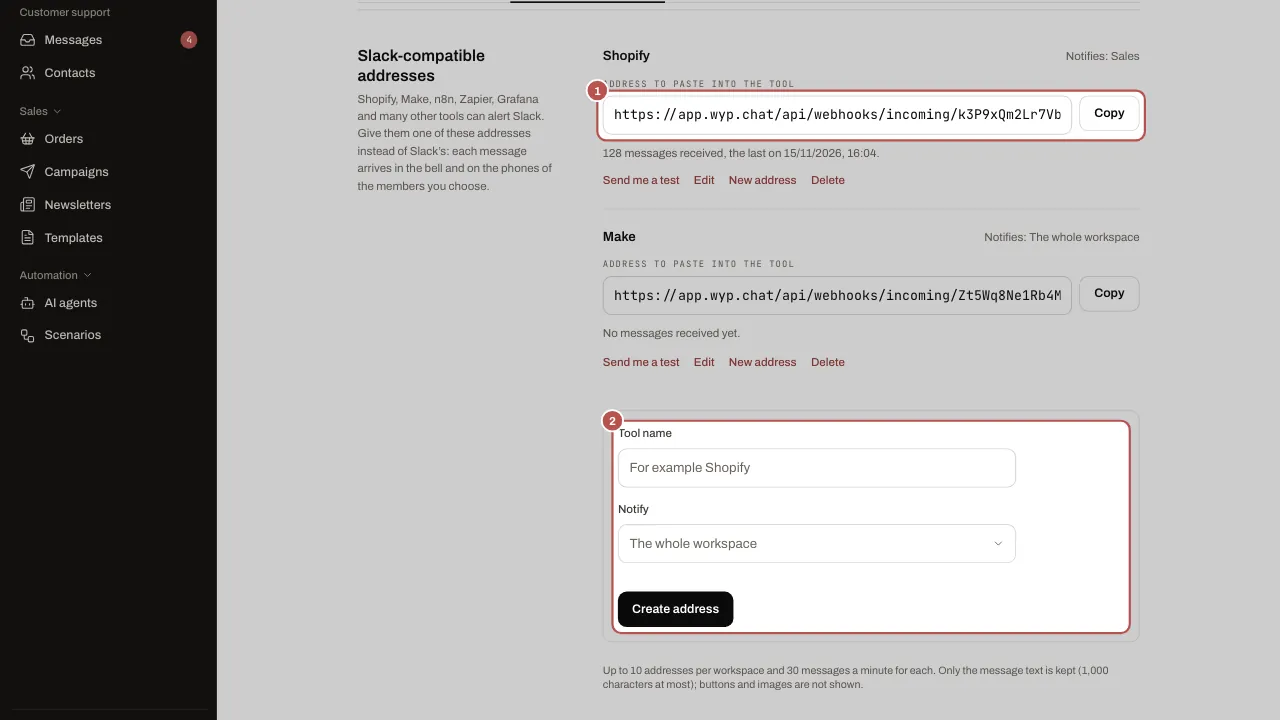
- Click Copy next to the address, then paste it into your tool where it asks for a Slack webhook address (“Slack incoming webhook”, “Webhook URL”).
- Click Send me a test: a notification arrives in your bell. Then trigger a real message from the tool: the section’s counter shows the messages received and the time of the last one.
Related articles
- Get alerts in Slack WYP.chat sends its alerts to Slack: new conversation, response time almost exceeded, assignment, channel health.
- Organise the team: teams, response times, quick replies, tags Teams share out the conversations, response times prevent anything being forgotten, and quick replies and tags save everyone time.
- Install WYP.chat on your phone and get notifications Install WYP.chat on iPhone or Android without an app store, then turn on notifications to be alerted to every new message, even when your phone is locked.