
Send a proposal to accept
Prepare a proposal (products, discount, delivery, validity): the customer accepts it with a button, and the order confirms itself.
Steps
- In the conversation, click Order, then the Proposal tab.
- Add the products, any discount, the Delivery date and the Valid until date.
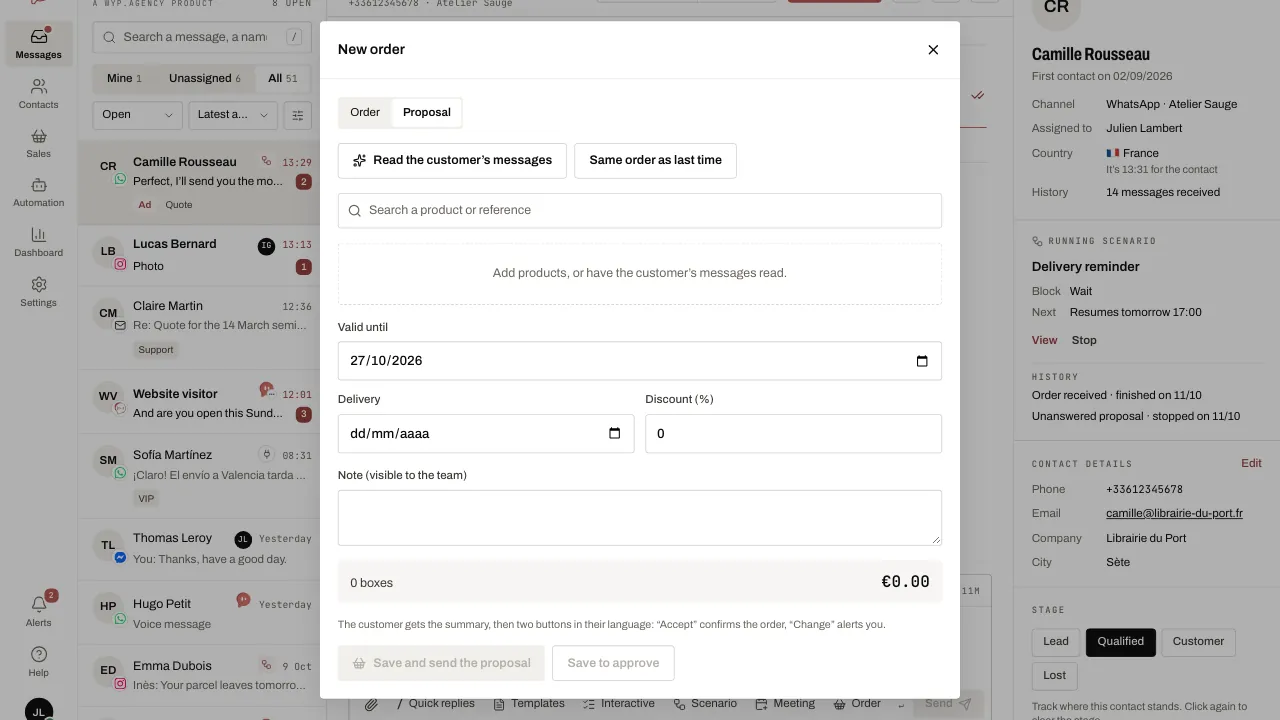
- Click Save and send the proposal: the customer receives the summary then two buttons, Accept and Change (in their language).
- If they accept, the order is confirmed and whoever created the proposal is notified. If they ask for a change, the proposal stays open and its creator is notified too. Send the proposal again sends it to the customer once more.
Related articles
- Receive and confirm an order Take orders through the WhatsApp cart, by message or by voice: WYP.chat turns each one into a record counted in boxes, with a delivery date and a summary.
- Import your product base Import your price list once: your products are then used for orders, proposals, product messages and the WhatsApp catalogue.