
Suggest a Google Meet meeting
Suggest a free slot from your Google calendar: the meeting is created with a Meet link, and the message to the customer is ready to send.
Steps
- First connect your calendar: Settings › My account › Google Calendar and Meet › Connect Google Calendar.
- In a conversation, click Meeting in the reply box.
- Check the Meeting title and the Duration, then choose a Free slot in your calendar. Only your free slots are offered, every 30 minutes and 4 per day at most, during opening hours (with no hours set: Monday to Friday, 9 am to 6 pm), starting from one hour ahead and over 10 days.
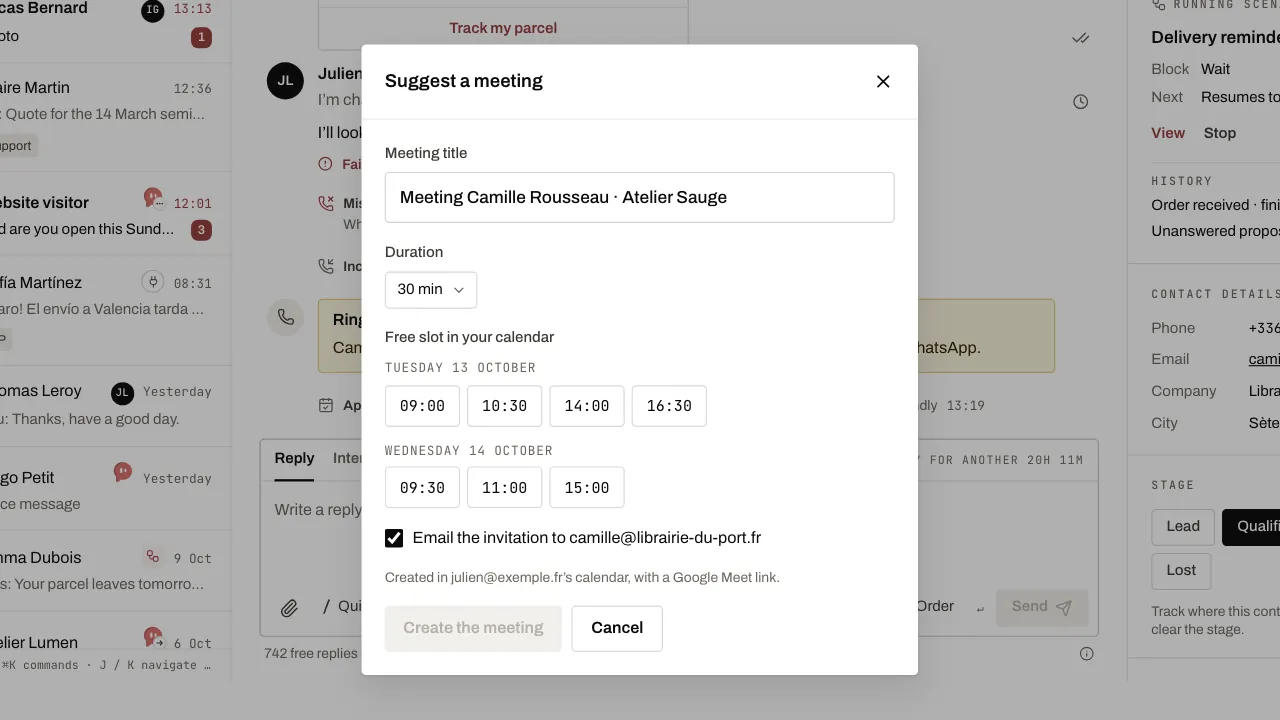
- Tick the email invitation if you know the customer’s address, then click Create the meeting.
- The message with the Meet link is filled in for you in your reply: read it through and send it.
Related articles
- Sign in with Google Get into WYP.chat with your Google account, with no password to remember.
- Connect Calendly to WYP.chat Paste a Calendly token in Settings: every booking, reschedule or cancellation shows in the customer’s conversation. Needs a paid Calendly plan.
- Connect Cal.com to WYP.chat Paste a Cal.com API key in Settings: every booking, reschedule or cancellation shows in the customer’s WhatsApp conversation.