
Connect Telegram to WYP.chat
To connect Telegram, create a bot with @BotFather, Telegram’s official account, then paste its token in Settings › Channels, Add a channel, Telegram card: the messages your customers send to that bot arrive in the same inbox as WhatsApp. It takes about five minutes, with nothing to install or code.
Steps
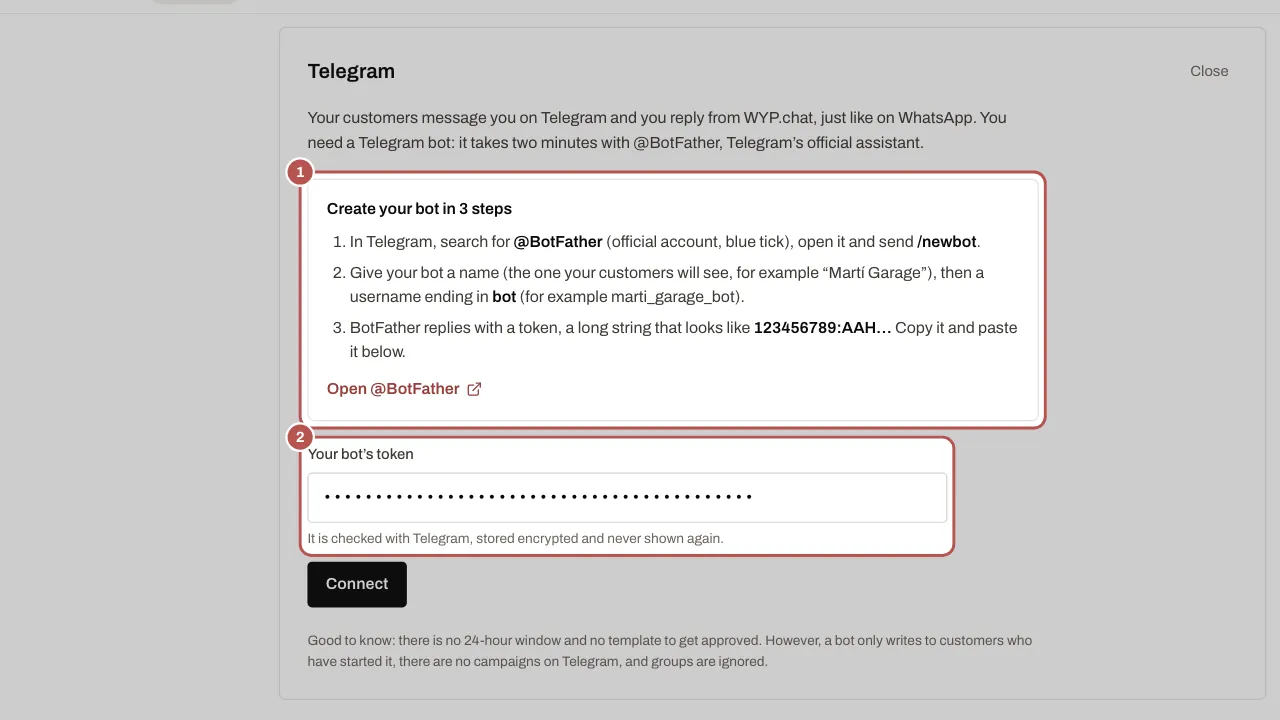
- Open Telegram on your phone or computer and search for @BotFather. Pick the official account, the one with the blue tick. Tap Start, then send
/newbot. - BotFather asks for your bot’s name: this is the name your customers will see, for example “Garage Martí”.
- It then asks for its username, which must end in “bot”, for example
garage_marti_bot. If it is taken, try a variation. - BotFather replies with a token, a long string such as
123456789:AA…. Copy all of it and keep it to yourself: it gives access to your bot. - In WYP.chat, open Settings › Channels, click Add a channel, then the Telegram card.
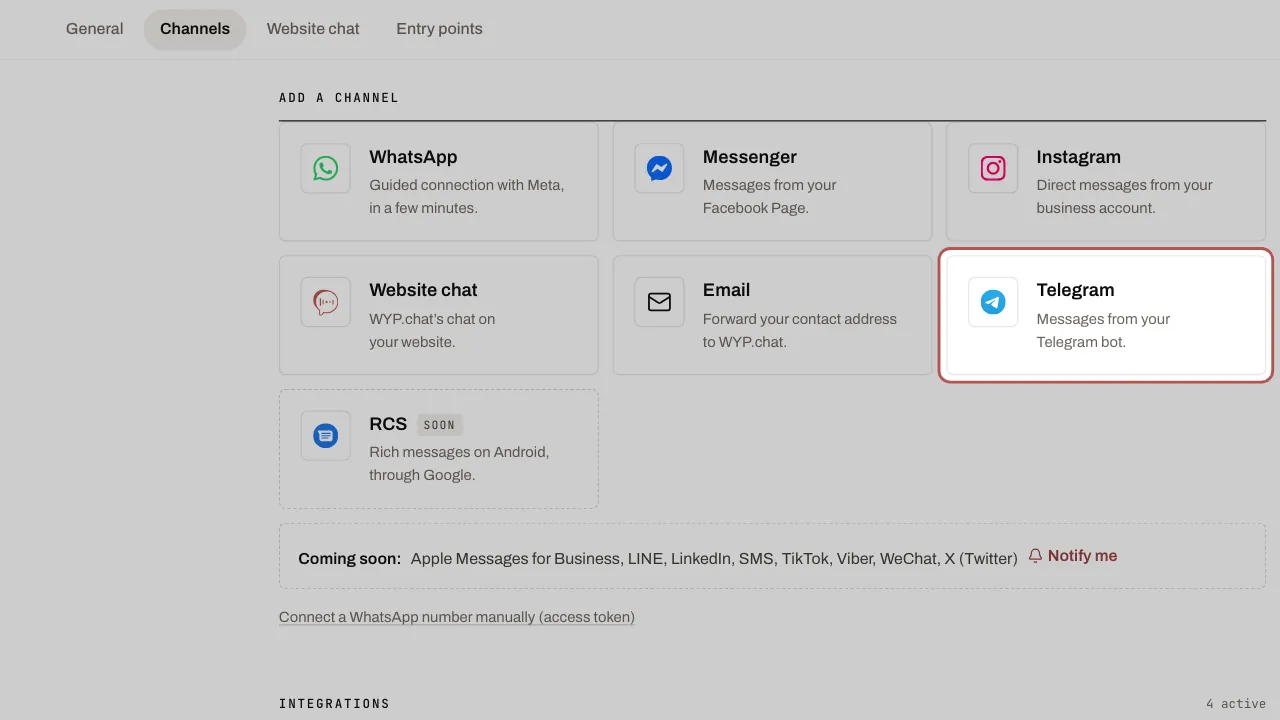
- Paste the token and click Connect. WYP.chat checks the token with Telegram and sets up incoming messages on its own.
- Try it from your own Telegram account: open your bot, tap Start and write “Hello”. The message shows up in the inbox, with the Telegram icon.
Let customers find your bot
Once connected, the Telegram channel shows your bot’s address, t.me/ followed by its username, a Copy the link button and a QR code, with Download the QR code.
- Put the link on your website, in your email signature, on your quotes and invoices.
- Print the QR code on your shop window, your counter or your business card: customers scan it with their phone and the chat opens in Telegram.
- The customer taps Start, then writes. Until they do, your bot cannot message them.
In the inbox
A Telegram conversation works like a WhatsApp one: assignment, teams, internal notes, Slack alerts, quick replies.
- You receive text, photos, files, voice messages (transcribed if your AI agent is on), videos, a shared location or contact.
- You send text, photos, files, videos and buttons.
- The customer record shows their name, their @username and their Telegram ID. Telegram never shares their phone number unless they share it themselves, so their record is not grouped automatically with their WhatsApp record (see Group a customer who uses several channels).
- Your AI agent can reply on Telegram, with the same setting as on WhatsApp, Messenger and Instagram: see Your AI agent on WhatsApp, Messenger, Instagram, Telegram. Scenarios work too, and their buttons become Telegram buttons.
What is different from WhatsApp
- No 24-hour window: you can reply whenever you like to a customer who has written to you, even days later.
- No templates to get approved.
- Your bot only messages people who have started it: no first message to someone who has never written to you on Telegram, and no Telegram campaigns for now.
- Private messages only: if the bot is added to a Telegram group or channel, those messages are ignored.
- If the customer types
/stopor blocks the bot, they receive nothing more: your AI agent and scenarios go quiet, and a blocked bot can no longer message them. If they write to you again or restart the bot, the conversation carries on. The conversation thread shows it each time.
If the channel needs reconnecting
If the token was changed in BotFather (the /revoke command), Telegram rejects the old one and the channel shows as needing to be reconnected: your replies no longer go out. Copy the new token BotFather gives you (/mybots, your bot, then API Token), open the Telegram channel in Settings › Channels, expand Paste a new token, paste it and click Reconnect. It is the same bot, at the same t.me/ address, and the history is kept.
Disconnect
Open the Telegram channel in Settings › Channels and click Disconnect. Incoming messages stop, and the conversation history stays available in WYP.chat. Your bot still exists in Telegram: to delete it, send /deletebot to BotFather.
Related articles
- Connect Messenger, Instagram and your email address Messages from your Facebook Page and your Instagram business account arrive in the same inbox as WhatsApp, and so do emails to your contact address…
- Your AI agent on WhatsApp, Messenger, Instagram, Telegram Your AI agent answers your customers on WhatsApp, Messenger, Instagram and Telegram once the owner has turned it on and you have chosen, channel by…
- Send an interactive message (buttons, list, carousel, products) An interactive message lets the customer reply with a single tap: a button, a list row, a carousel card.
- Group a customer who uses several channels WYP.chat groups a customer who writes on WhatsApp, Instagram and by email into one record: shared name, tags and notes, conversations kept per channel.