
Send an interactive message (buttons, list, carousel, products)
An interactive message lets the customer reply with a single tap: a button, a list row, a carousel card. WYP.chat sends it in the best possible form on each channel, and the customer’s reply arrives in the thread.

Steps
- In the reply box, click Interactive: the Interactive message window opens.
- Choose the type at the top: Text, Buttons, List, Carousel, Products or Location. Form is coming soon.
- Write the Main text, then fill in the rest depending on the type:
- Buttons: 3 at most, with Add a button.
- List: an Opening button and up to 10 rows, each with an optional description.
- Carousel: 2 to 10 cards, each with an image (https link), a title, a text and reply buttons or a link. On WhatsApp, after 24 hours without a message from the customer, a carousel can only go out in a marketing message approved by WhatsApp.
- Products: up to 30 products chosen from your product base.
- Location: the customer receives a button to share their location, which arrives in the conversation.
- Text: a simple message, with an optional Link button.
- To save time, click Start from a ready message: order confirmation, reminder the day before, proposal follow-up, review request, slot choice, new arrivals carousel.
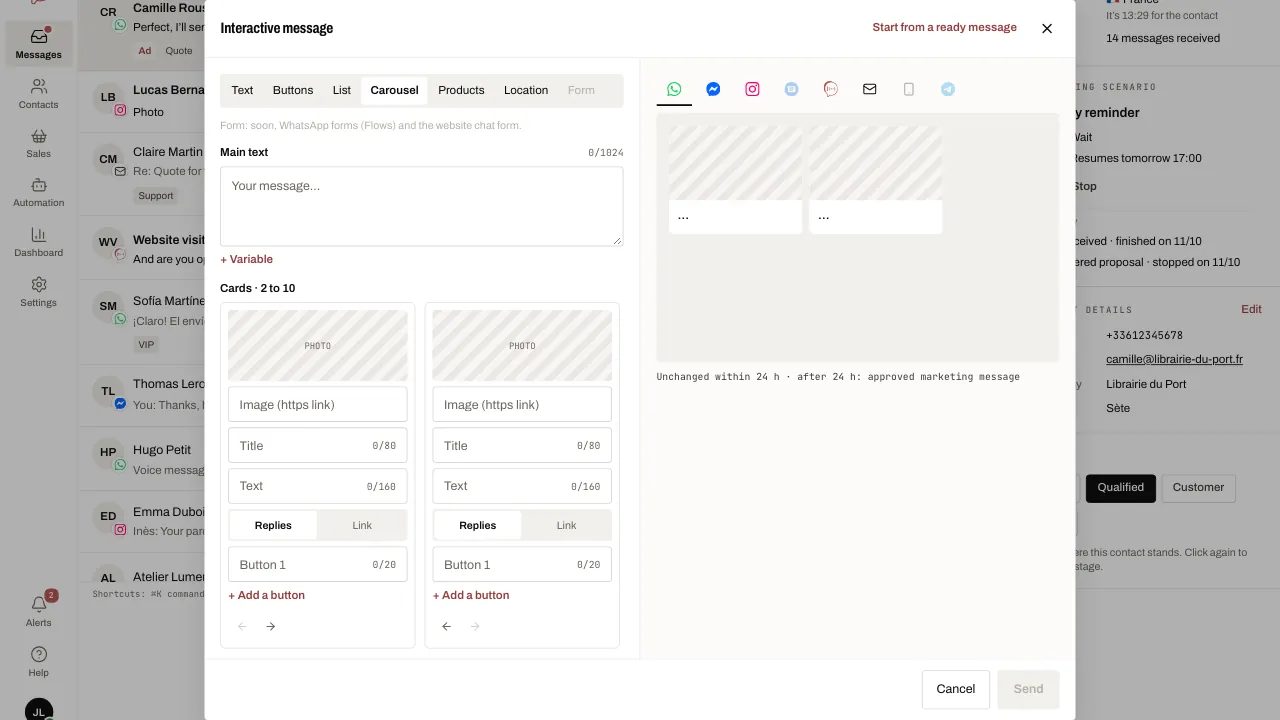
- Check the Preview: tap a channel’s icon to see the message as the customer will receive it. Hover over an icon to see whether the message goes out unchanged on that channel or how it is adapted.
- Click Send. The customer’s choice appears in the thread with its label.
Related articles
- Write to a customer after 24 hours After 24 hours without a message from the customer, WhatsApp only lets you send a template it has approved.
- Create a scenario Create a WYP.chat scenario from the gallery or from scratch, started by a message or by your AI agent, test it in the simulator, then activate it.
- Receive and confirm an order Take orders through the WhatsApp cart, by message or by voice: WYP.chat turns each one into a record counted in boxes, with a delivery date and a summary.