
See who is replying to the customer
A conversation has only one voice at a time. The “who is replying” badge, to the right of the contact’s name, tells you which: you never reply at the same time as a scenario or your AI agent.
What the badge shows
- A member’s initials: someone on the team has replied in this conversation, or it is assigned to a person who is available during your hours. Your AI agent and scenarios stay quiet.
- A scenario icon: a scenario is running, for example “Follow-up without reply · waiting for a reply”. It may be waiting for a reply from the customer, a date or an order.
- Your AI agent’s look (Coucou or Allô): it is replying to the customer, suggesting replies, has a suggestion to review, or has handed over to the team. It may also have taken over because nobody on the team had replied to the customer (see Your AI agent on WhatsApp, Messenger, Instagram, Telegram).
- Other tool: another tool connected to the number (for example Meta’s AI agent) is replying. WYP.chat follows the conversation without replying.
- Nothing: nobody is replying for you, the conversation is waiting for the team.
The order never changes: other tool, then the team, then a scenario, then your AI agent.
Steps
- Open Messages, then the conversation. In the list, the badge appears to the right of the name: hover over it to see who is replying.
- Click the badge at the top of the thread. A sentence explains who is replying and what happens if you write.
- Click Take over to reply yourself: the scenario stops, your AI agent is paused on this conversation, or WYP.chat asks the other tool for control. If the AI agent has already handed over, the conversation is assigned to you.
- Or click Let it run: nothing changes.
Customer with no reply
When a customer has been waiting more than 15 minutes with no reply from a team member, your AI agent or a scenario, the conversation shows the No reply · 25 min badge and the No reply button appears under the list views, with how many there are: click it to see only those conversations.
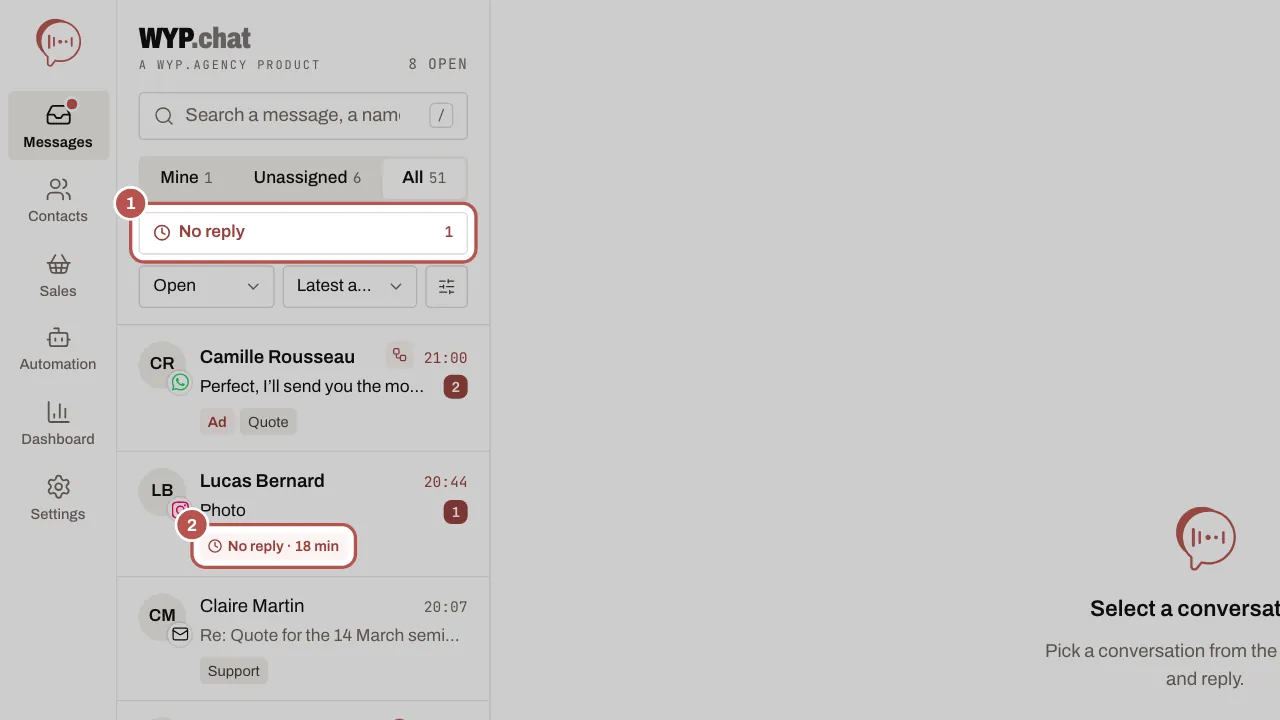
Members who can reply get the A customer is waiting for a reply notification once (and an email reminder if it stays unread). The automatic acknowledgement, marked Automatic acknowledgement in the thread, does not count as a reply. This applies to the website chat, WhatsApp, Messenger, Instagram and Telegram.
Related articles
- Assign a conversation Assign each conversation to a person and a team: everyone knows who is replying.
- Follow and edit an active scenario You run an active scenario from its diagram: how many contacts enter it, where they stop, who is in progress.
- Your AI agent on WhatsApp, Messenger, Instagram, Telegram Your AI agent answers your customers on WhatsApp, Messenger, Instagram and Telegram once the owner has turned it on and you have chosen, channel by…