
Write to a customer after 24 hours
After 24 hours without a message from the customer, WhatsApp only lets you send a template it has approved.
Steps
- Prepare the template in Sales › Templates (see Prepare a template). WhatsApp often approves it in less than an hour.
- While the 24 hours are running, the reply box shows You can reply freely for another …, with the time left. After that, the reply box is replaced by Free replies are over (24 hours passed). Click Choose a template. You can also write an Internal note for the team.
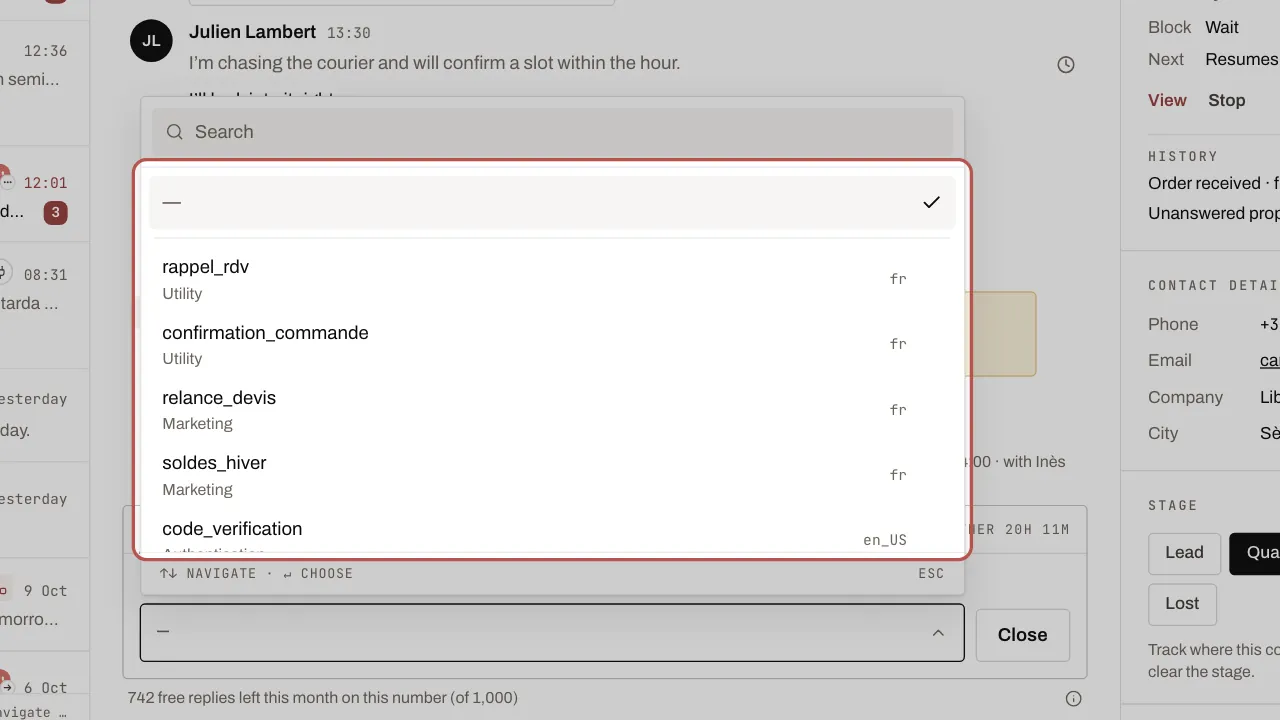
- Choose the template, fill in its Variables if there are any, check the preview, then click Send template.
Related articles
- Prepare a template for your campaigns A WhatsApp campaign always sends an approved template. Create it in Sales › Templates, pick Marketing or Utility and send it to WhatsApp for approval.
- Connect your WhatsApp Business number Until Meta approves WYP.chat, our team sets up this connection with you. The steps below describe it.
- What you pay Meta on WhatsApp Meta charges your own card directly for WhatsApp messages beyond its free allowances. Rules, October 2026 rates for the UK, France and Spain, examples.